 RGB Tray
Logitech
G915 TKL (LIGHTSPEED receiver)
Static, breathing, spectrum and off; per-key colors with a key editor; the wave and ripple effects of the firmware; battery.
All your RGB lighting from one tiny tray app.
RGB Tray talks to keyboards, mice and lights directly over HID, and to Tuya bulbs over your local network. Color, effect and brightness for everything at once or one device at a time, with no vendor software running in the background.
Instead of G HUB Synapse Armoury Crate SignalRGB
01
Every brand has its own lighting app, and each one wants to run in the background. RGB Tray does the lighting part for all of them in one.
It speaks each device's protocol itself, so G HUB, Synapse, Armoury Crate or SignalRGB don't need to run. Installing takes no administrator rights.
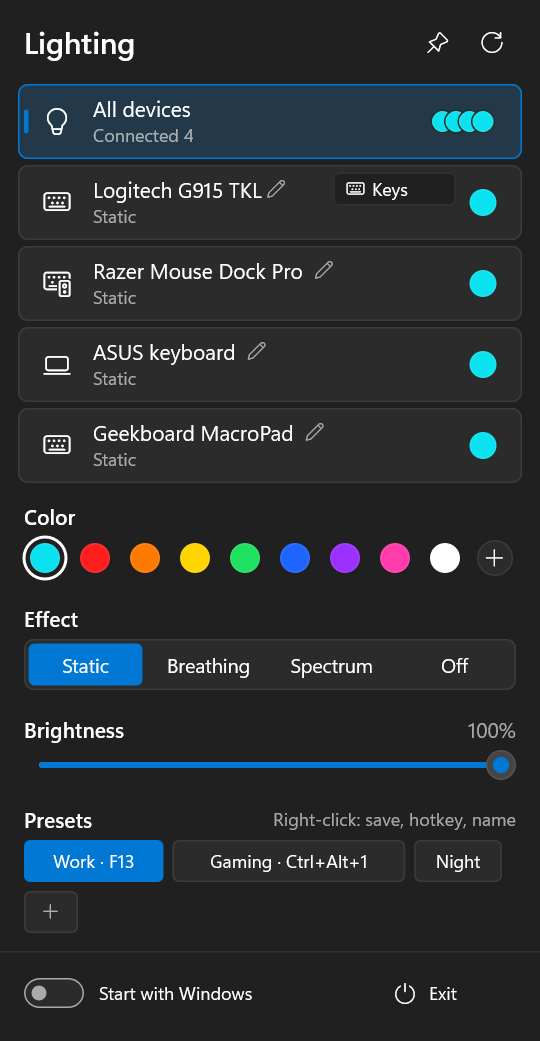
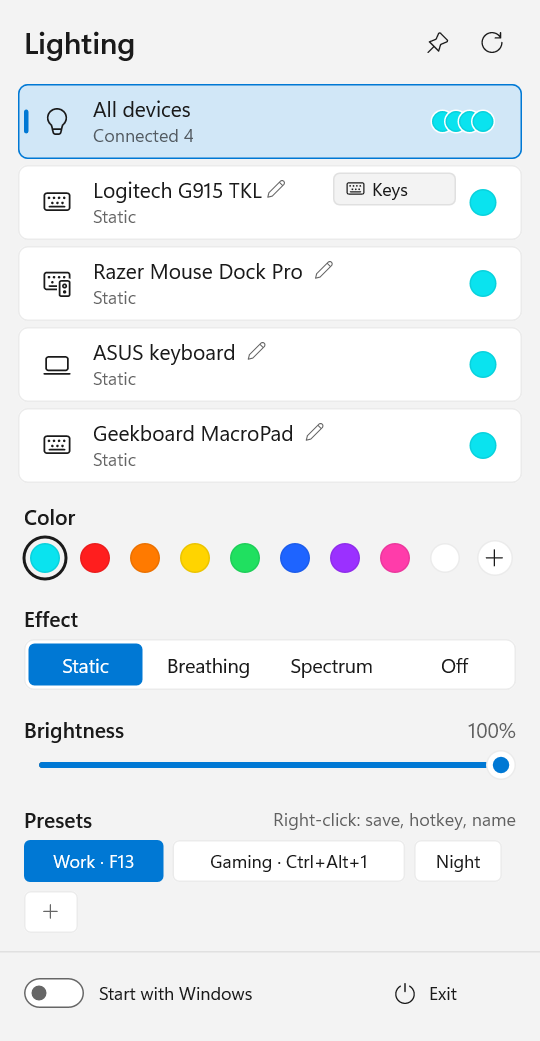
A left click on the tray icon opens the panel: color, effect and brightness for all devices at once or per device, and presets you can put on global hotkeys.
Lighting comes back after sleep (Modern Standby too) and when a device is plugged in, dims with the screen and goes off while the screen is off.
02
Six families today. Other models that speak the same protocols may work too, and a new one can often be added with a small text file.
G915 TKL (LIGHTSPEED receiver)
Static, breathing, spectrum and off; per-key colors with a key editor; the wave and ripple effects of the firmware; battery.
Naga V2 Pro, Mouse Dock Pro and about 90 more
Basilisk, DeathAdder, Viper, Cobra, BlackWidow, Huntsman, Ornata, Firefly, Goliathus, Base Station and others from OpenRazer's data: effects, zones of mice, battery. Most of them are untested; their card says so, and a report is welcome.
Laptop keyboards (Aura)
Static, breathing, spectrum and off; the keyboard zones and the body lamps through LampArray. The keyboard resets itself to white on wake, so the lighting is applied again.
Geekboard MacroPad v2, Keychron, hand-built boards
Any QMK keyboard with VIA and RGB: static, breathing, spectrum, off and brightness. Colors are set in RAM only, so the board's own saved settings stay untouched.
HID LampArray devices
Devices with the LampArray standard: static, breathing, spectrum and off, with the zones the device describes itself. Breathing and spectrum are drawn by the app.
Wi-Fi bulbs in Smart Life, e.g. LINUS A60
Over the local network: color, white with its tint, breathing, spectrum and off. A bulb doesn't go dark with the screen. It needs the bulb's local key, fetched once from the Tuya cloud.
Connections, every Razer model and how to get a Tuya key are in the full device table on GitHub.
03
Small, but not bare: the things you would otherwise open a vendor app for.
A global brightness with a per-device one on top of it; the speed of breathing and spectrum, global and per device.
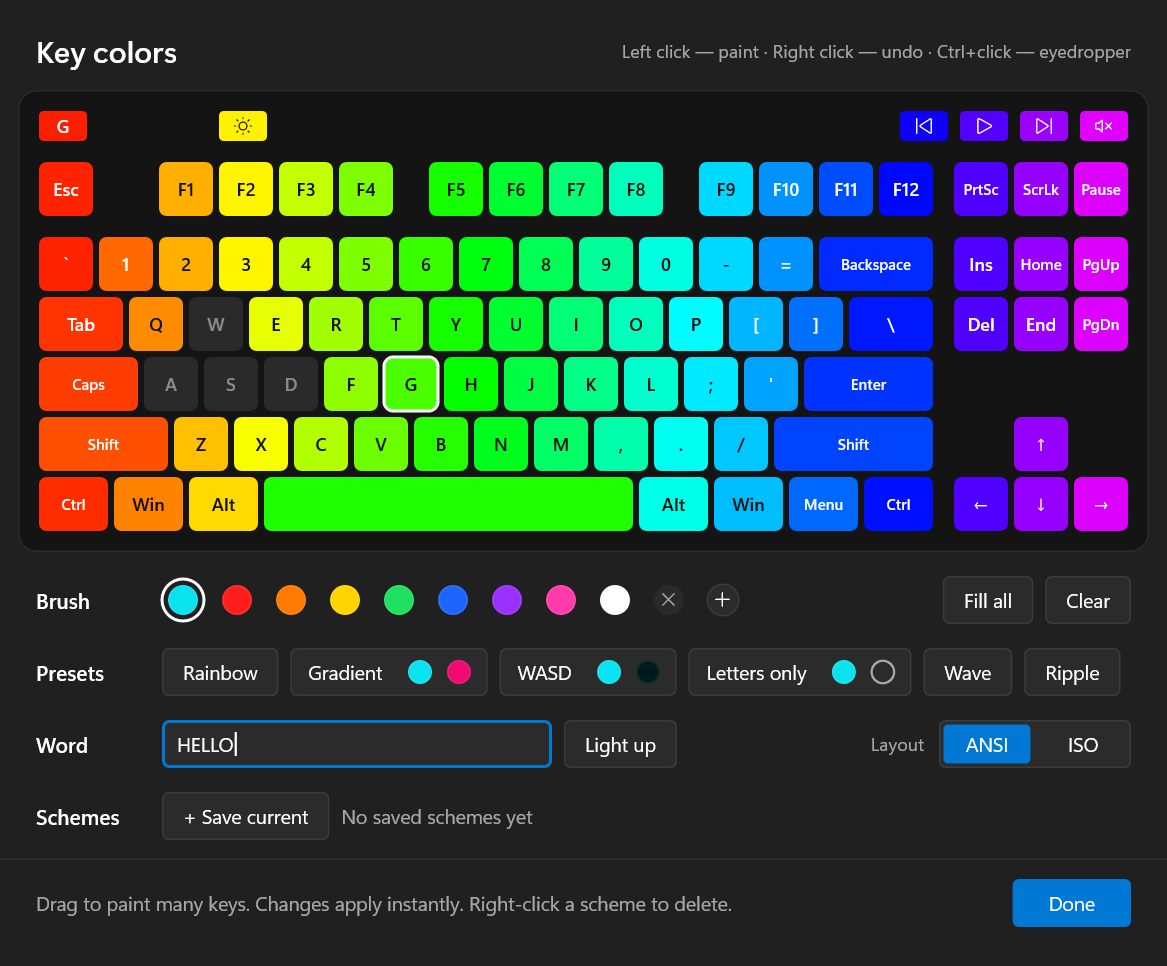
For the Logitech keyboard: brush, eyedropper, rainbow, two-color gradient, WASD and letters-only presets, a highlighted word, saved schemes, ANSI and ISO layouts.
Save a look and switch to it with a global hotkey, F13–F24 with Ctrl, Alt, Shift or Win included.
Switches one device off and back on as it was, for example a room lamp. Presets are not affected.
Dims when Windows dims the screen and goes off while the screen is off: idle, locked or asleep. Can be switched off.
Battery levels, alerts at 10% and 5%, and a “No link” status while a wireless device sleeps; its colors come back when it wakes.
Identical devices have their own settings, told apart by serial number. Disconnected ones wait in an archive with their settings.
Export and import all settings, or save one preset to a file: it goes to the receiver's devices of the same models.
Once a day the app asks GitHub for the latest release and shows a card that installs it. The check can be switched off.
The tray icon shows the current color, the panel can be pinned on top, the theme follows Windows, and the interface is in English or Russian.
04
The panel in the dark and the light theme, and the per-key editor of the Logitech G915 TKL. Click to enlarge.
05
Good to know before you uninstall anything.
06
Many devices need no code at all, only a small profile file. With Claude Code you don't even need to know Rust or HID: Claude does the technical work, you watch the lights.
The repository comes with an /add-device skill for Claude Code. It takes Claude from the device report to a tested profile or driver, and to a pull request if you want one.
On the Windows PC the device is plugged into, clone github.com/Gronck2/rgb-tray and start Claude Code in that folder. For a profile, the installed app's command-line tools are enough; a driver needs Rust, and Claude helps you install it.
Say which device it is and what lights up on it. Quit the vendor's app first, so that two programs don't fight over the device.
It runs rgbtray --diagnose, finds your device by its vendor and product ids and sees which of its interfaces speak a protocol RGB Tray already knows.
In OpenRGB or OpenRazer, in a USB capture of the vendor app that you record (how), or by careful tries with --hid-send, one at a time and only with your yes.
It writes the profile, checks it with --profile-check and plays colors, zones and effects with --profile-test. After each step it asks what the device did.
Claude copies the profile to %APPDATA%\rgbtray\devices\; restart RGB Tray and the device has its card on the panel. Then it asks whether you want to share it.
Claude can’t see the lights, so nothing counts as working until you say so. It never sends firmware update, bootloader, factory reset or save-to-flash commands, and it asks before sending any report it made up. If a device stops responding, unplug it and plug it back in.
Whether you work with Claude or by hand, the device takes the first route that fits.
HID LampArray devices and QMK keyboards with VIA are driven by generic drivers. Open the panel and look for the card.
A new Razer model is a small TOML file with its product ids, transaction id and LED ids, taken from OpenRazer. A QMK/VIA profile can name the firmware's effects.
[hid] profileA simple protocol, reports with the color in them and no answers needed, is written as report templates with {r} {g} {b}. It also does XOR or sum checksums, “take control” and “give back” reports and per-LED colors. No compiling.
A protocol that needs answers, a handshake or state is a driver: a module that implements the Device trait. CONTRIBUTING.md walks through it.
Profiles are written and checked with the app itself, no build needed. It is a Windows program without a console, so each tool writes its result to the file you name.
| Command | What it does |
|---|---|
rgbtray --diagnose report.txt | Every HID device and interface, the ones RGB Tray knows marked, and the profile files with mistakes. |
rgbtray --hid-send out.txt <vid:pid[:page[:usage]]> <feature|output|get> "<hex>" | Sends raw reports and appends the answers to the file, for working out a protocol. |
rgbtray --profile-check out.txt my-device.toml | Reads a profile without touching any device and writes what the app makes of each model, or what is wrong with it. |
rgbtray --profile-test out.txt my-device.toml | Plays red, green, blue, dim white, each zone, breathing, spectrum and off on the device of a [hid] profile, logging each step. |
Your own profiles go into %APPDATA%\rgbtray\devices\ and work after a restart of the app; one with the same key replaces a built-in profile. The fields and every protocol section are in docs/profiles.md.
When your device works, a pull request makes it built in for every RGB Tray user. Claude can do all of it for you with gh pr create:
profiles/<vendor>-<model>.toml and into BUILT_IN in src/devices/profile.rs, with tested = true only if it was checked on the device.cargo fmt --check, cargo clippy and cargo test.07
One file: the installer is the app itself. No runtime to install and no administrator rights.
RGBTray-Setup-x.y.z.exe
RGBTray-Setup-<version>.exe from the latest release.%LOCALAPPDATA%\Programs\RGB Tray and starts.SmartScreen may warn the first time. The installer is not code-signed yet: choose More info → Run anyway. Every release lists the SHA-256 of its installer.
Close vendor lighting software. Two programs writing to one device fight each other. On Windows 11 the “Logitech LampArray” service (Dynamic Lighting) makes the G915 ignore effects; RGB Tray warns about it and offers to disable it.
Your settings are safe. They live in %APPDATA%\rgbtray and survive updates and reinstalls. Copies from the last 14 days and from before each update are kept in backups, and a damaged settings file is replaced by the last copy that works.
Windows 10 or 11 and stable Rust with the x86_64-pc-windows-gnu or -msvc toolchain. The installer is the same executable: named RGBTray-Setup-*.exe, it installs itself.
git clone https://github.com/Gronck2/rgb-tray
cd rgb-tray
cargo build --release            # target\release\rgbtray.exe
.\scripts\release.ps1 # dist\RGBTray-Setup-<version>.exeRGB Tray is free and open source. The most useful help needs no code: a device report, or testing a build on hardware the project doesn't have. And a star on GitHub helps other people find it.
Issues and requests go to GitHub; writing there needs a free GitHub account.